Sleep Music Alarm icon

Fall asleep and
wake up to music

Set YouTube videos, playlists, or Apple Music tracks as your alarm. An alarm app built around music and sleep.

Download on the App Store

Over 1M downloads · #1 Health & Fitness in Japan (March 2024)

11:00 PMFall asleep
The sleep timer running at 11:00 PM, with a starry night YouTube video playing below the clock
6:30 AMWake up
The alarm ringing at 6:30 AM, with a YouTube video playing and a Stop button

New to Sleep Music Alarm? Set up your first alarm →

Music, from dusk to dawn

From the moment you fall asleep to the morning you wake up. An alarm clock, sleep timer, and sleep tracker in one app, with interval and Pomodoro timers too.

YouTube / Apple Music alarm

Set any video, playlist, or Apple Music track as your alarm. A new song every morning.

  • YouTube videos, Shorts, playlists, or a channel's latest video
  • Apple Music, imported songs, and your own recordings
  • Shuffle for a different song or video every morning
  • Fade in gently, or turn up the volume for heavy sleepers
  • Hear the current time and your alarm memo read aloud

Wake-up missions

  • Pedometer: the alarm rings again if you don't walk enough steps
  • Custom Quiz (Multiple Choice or Typed)
  • Math (Easy or Hard)
  • Color Match, Whack-a-Mole, and Rolling Ball
  • Shake, Squats, and Torso Twist
  • Enter Passcode or a random mission

Sleep sounds & sleep timer

  • Fall asleep to YouTube or Apple Music
  • Keep playing in Picture in Picture, even on the Home Screen or Lock Screen
  • Let the sleep timer stop playback
  • Dim the screen to reduce glare and battery use
  • Pick videos and songs from favorites or history
  • Watch YouTube live streams with chat below the video

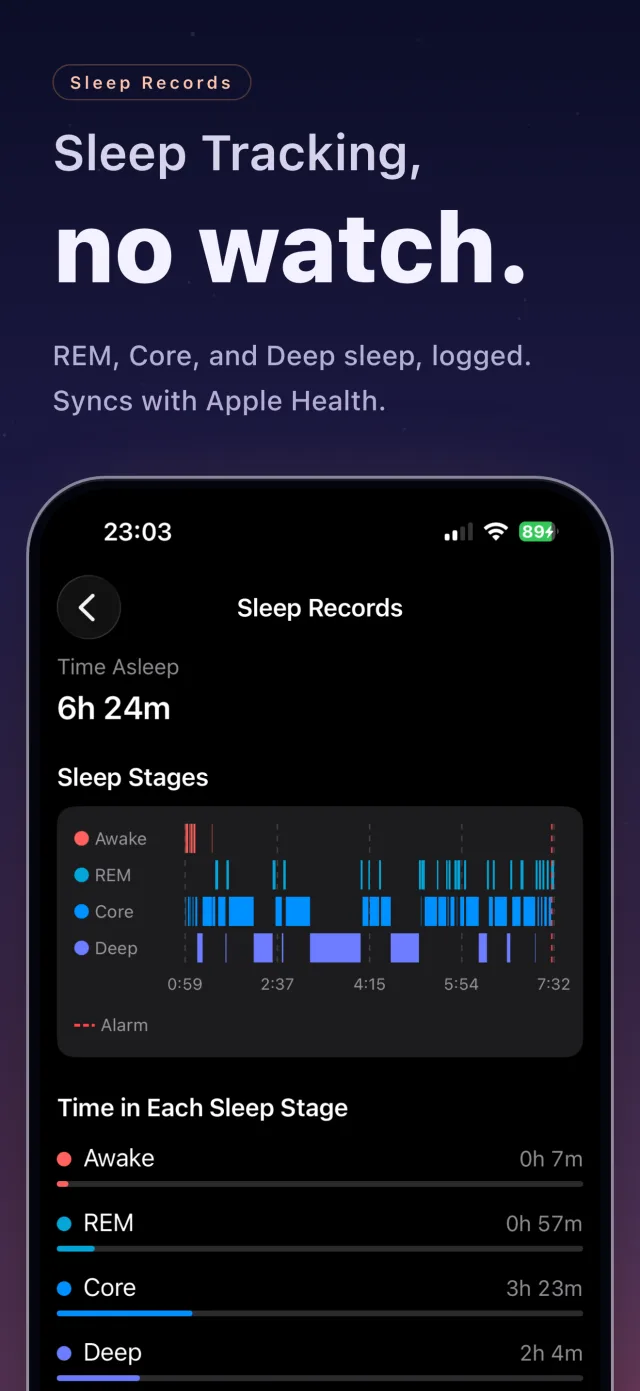
Sleep tracking

  • Estimates Awake, REM, Core, and Deep sleep from your movement
  • iPhone only, no Apple Watch required
  • Edit your records later
  • Save to Apple Health (optional)
  • View trends in charts

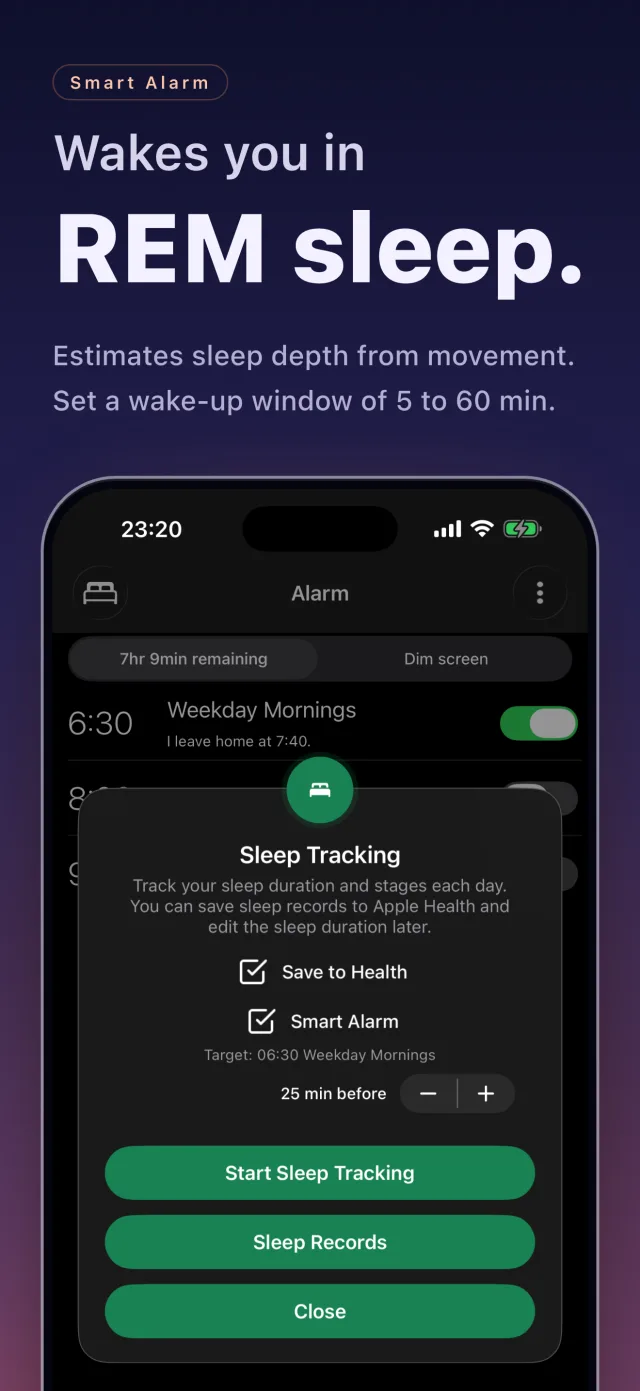
Smart alarm

  • Wakes you during REM sleep or when you're already stirring
  • Choose a window of 5 to 60 minutes before your alarm
  • Apple Watch also uses your heart rate

Flexible scheduling

  • Repeat on weekdays, weekends, or custom days
  • Skip public holidays in over 100 countries
  • Skip just the next alarm with a swipe
  • Exclude specific dates from a repeating alarm
  • Set alarms for sunrise or sunset
  • Snooze from 1 to 60 minutes
  • Shift multiple alarms earlier or later at once
  • Group alarms and turn a whole group on or off
  • See today's calendar events after stopping an alarm

AlarmKit Assist

  • iOS 26 and later
  • A backup system alarm through Apple's AlarmKit
  • Ready in case the app closes unexpectedly

Timer

  • Multiple timers for cooking, studying, workouts, naps, and more
  • Use YouTube or Apple Music as the timer sound
  • Group timers and start, pause, or reset them together
  • Labeled timers log your time to Activity History

Interval timer

  • Pace strength training, HIIT, Tabata, and boxing with Work and Rest cues
  • Switch automatically by time, or tap Complete Set to start your rest
  • Set phases to the second and save presets, or start from templates
  • Get sound, vibration, and voice cues
  • Sound cues work in Silent Mode, with your music playing
  • Log workout time to Activity History

Stopwatch

  • Track lap and split times
  • Hear elapsed time announced at a set interval, such as every minute, even in the background or on the Lock Screen
  • Save your time to Activity History with a label
  • Laps and splits are saved too, to review later

Focus timer (Pomodoro)

Alternate focus and breaks to get work done.
  • Start from templates like 25/5 minutes × 4, and save your own presets
  • Use YouTube or Apple Music from the Clock screen as background music
  • Get cues by sound, vibration, voice, or notification (sound cues work in Silent Mode)
  • Track how often you pick up your phone and for how long
  • Log focus time to Activity History, with a label for each set
  • See your focus time and completed sets when you finish
  • Get a warning before you start if an alarm or timer overlaps

Activity history

  • See time from the Timer, Interval Timer, Focus Timer, and Stopwatch in one place
  • Create labels like Study or Exercise, and organize them into categories
  • View daily, weekly, and monthly totals by label or category
  • Look back with breakdowns and daily charts
  • Set weekly or monthly goals and track your progress

Widgets & Live Activities

  • Home Screen and Lock Screen widgets
  • Apple Watch widgets
  • Live Activities on the Lock Screen and in the Dynamic Island
  • See your next alarm at a glance

iPhone Duo

  • The layout adapts as you open, close, or rotate the screen
  • YouTube on one side, the next video on the other
  • Show live chat on the other side

More

  • Check when each alarm rang, its sound, and how you stopped it
  • Back up and restore alarms, timers, and settings (iCloud supported)
  • Change the text color and set a background image

A typical night, from bedtime to wake-up

The screen for starting sleep tracking
11:00 PMStart sleep tracking
The sleep timer running
11:00 PMFall asleep to YouTube
The alarm ringing screen
6:30 AMWake up to YouTube
A whack-a-mole mission
6:30 AMIt won't stop until you're up
The sleep stage chart
7:00 AMReview your sleep

Turn on Smart Alarm when you start sleep tracking to wake during REM sleep or when you're already stirring, within 5 to 60 minutes before your alarm.

Designed so you don't miss your alarm

You rely on it every morning, so reliability comes first

Rings in Silent Mode

Your alarm rings even in Silent Mode.

Switches to a backup sound

If streaming fails, the alarm switches to a backup sound automatically.

AlarmKit Assist (iOS 26+)

A backup system alarm through Apple's AlarmKit, in case the app closes unexpectedly.

Premium

No ads, and stop alarms from the Lock Screen

Most features are completely free. Premium adds the following.

$0.99 / mo
Download on the App Store
  • No ads
  • Weather forecast (current, hourly, 10-day)
  • Auto-stop alarms
  • Dismiss alarms directly from the Lock Screen

Improving since 2017

Since its release in 2017, Sleep Music Alarm has kept adding features and getting easier to use. We'll keep putting stable performance and ease of use first.

Frequently asked questions

YouTube videos, playlists, channel uploads, and Shorts; Apple Music tracks; imported audio files; and voice recordings. Shuffle playback is also supported. See the YouTube and Apple Music setup guides.
Yes. Use the sleep timer to fall asleep to music, the multi-timer for cooking, studying, or naps, the interval timer for strength training and HIIT, the focus timer (Pomodoro) to alternate focus and break periods, and the stopwatch with lap and split support.
Incoming calls, Low Power Mode, or Screen Time restrictions may interfere in rare cases. Your alarm rings even in Silent Mode and switches to a backup sound if streaming fails. AlarmKit Assist (iOS 26+) adds a backup system alarm in case the app closes unexpectedly. See alarm troubleshooting.
No. iPhone alone is enough. The app estimates Awake, REM, Core, and Deep sleep from your movement. On Apple Watch, the Smart Alarm also uses your heart rate.
Most features are free. Premium ($0.99/month) adds ad removal, weather forecasts, auto-stop alarms, and stopping alarms without unlocking your iPhone.

Start waking up to music you love

Better sleep, better mornings. Free to download.

Download on the App Store